Google today unveiled its long-awaited bicycle directions feature for Google Maps.
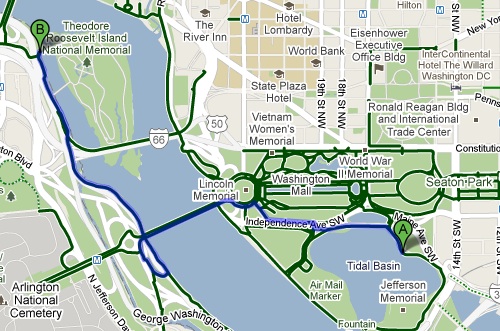
To access Google’s suggested bike routes, choose “Bicycling” from the pull-down menu in your directions results. Google says the tool prioritizes bike trails and bike lanes, while avoiding steep hills and busy intersections. Mapping results also offer a layer of designated bike trails and lanes, shown in green.
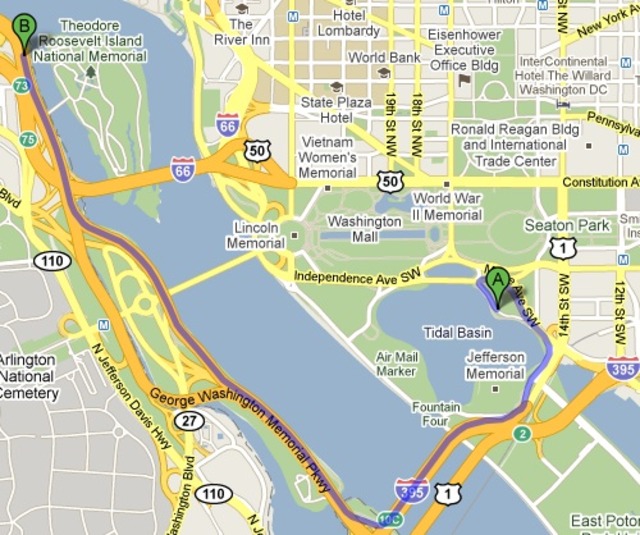
Here’s just one example of bicycle directions results vs. driving results for the same trip via Google:
In regular car-based driving directions from the Tidal Basin to Roosevelt Island, Google suggests taking Ohio Drive to I-395, then exiting on to the George Washington Parkway.

But in the bicycle results, it puts you on to the Mt. Vernon Trail.
Other cycling route map generators already exist, like Ride the City, but it’s certainly nice to be able to quickly compare bike vs. car vs. walking within Google Maps. That said, Google’s new feature is still in Beta, and reviewers like Rob Pegoraro at the Post are already finding problem areas, like the omission of 15th Street’s new contraflow bike lane. If you notice a bike lane or trail missing from the map, you can tell Google about it via this form.